App Store Connect API and CLI: automate uploads and TestFlight as an indie developer
What the App Store Connect API can do, how to create an API key, and which CLI to use (Xcode, Transporter, fastlane or asc) to upload builds and ship TestFlight.
· 5 मिनट में पढ़ें
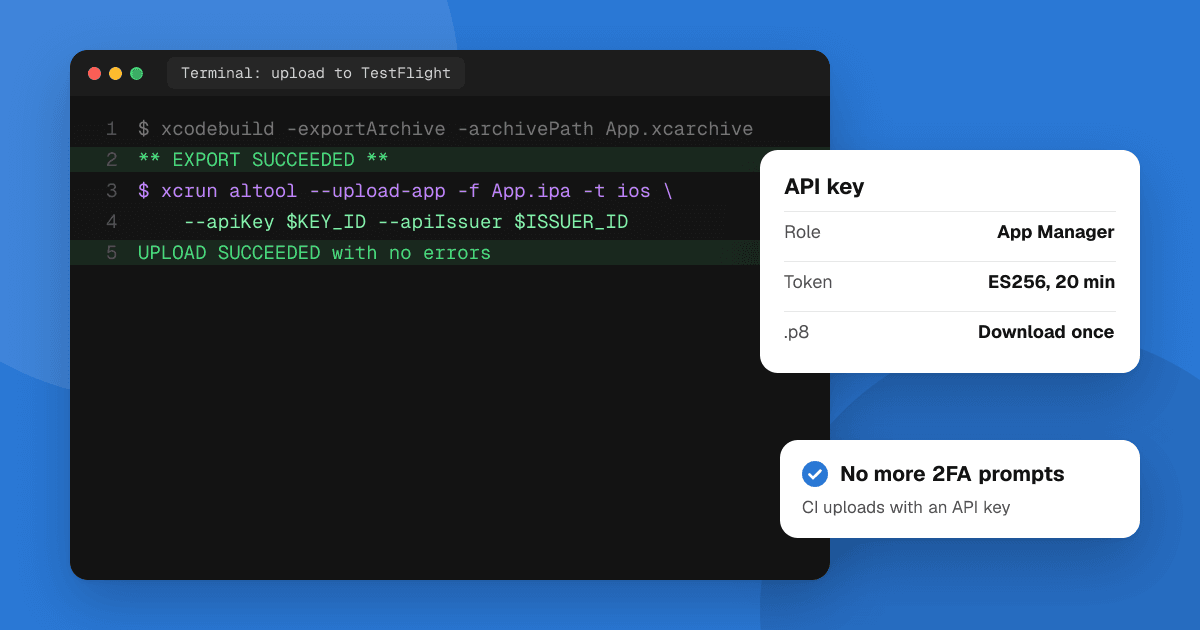
Short answer: the App Store Connect API is Apple's REST API for doing in code what you'd otherwise click in App Store Connect: managing TestFlight testers and builds, app metadata, in-app purchases, users, and downloading reports. You authenticate with an API key created under Users and Access → Integrations and a short-lived signed token (JWT). There's no single official "App Store Connect CLI": to upload builds you use Xcode, Apple's Transporter app or xcrun altool, and for everything else most indie developers use fastlane or an open-source CLI such as asc.
What can the App Store Connect API do?
- TestFlight: add testers and groups, attach builds to groups, and send builds to beta review.
- Builds: list builds and their processing state, set export compliance, and pick a build for a version.
- Metadata: update descriptions, keywords, what's new text and screenshots across languages.
- App Review: create a version, attach a build and submit it.
- In-app purchases and subscriptions: create products and change prices.
- Users and access: invite team members and set roles.
- Reports: download sales, finance and analytics reports.
It doesn't upload the binary itself; that's done by Xcode, Transporter or altool (below). Apple's App Store Connect API documentation lists every endpoint.
How do I create an App Store Connect API key?
- In App Store Connect, open Users and Access → Integrations → App Store Connect API. The Account Holder may first need to request API access.
- Under Team Keys, click +, name the key and choose the smallest role that works (App Manager is enough for uploads and TestFlight; Developer for read-mostly tasks).
- Download the
.p8private key. Apple lets you download it only once, so store it in your CI's secrets right away. - Note the Key ID and the Issuer ID shown on the page.
Treat the .p8 file like a password: never commit it, and revoke the key in the same screen if it leaks. Individual keys, tied to one user, are also available if you don't want a team-wide key.
How does API authentication work?
Each request carries a JSON Web Token signed with your private key using ES256:
- Header:
alg: ES256,kid: <Key ID>,typ: JWT - Payload:
iss: <Issuer ID>,iat(now),exp(at most 20 minutes later),aud: appstoreconnect-v1
Send it as Authorization: Bearer <token> and make a new token before it expires. Tools like fastlane and asc build the token for you from the key file, Key ID and Issuer ID. Apple also applies hourly rate limits per key; the remaining allowance comes back in a response header.
How do I upload a build from the command line?
Pick one:
- Xcode: Product → Archive, then Distribute App. Simple, but manual.
- xcodebuild + altool: export an
.ipawithxcodebuild -exportArchive, then upload it withxcrun altool --upload-app -f App.ipa -t ios --apiKey <Key ID> --apiIssuer <Issuer ID>.altoolno longer handles macOS notarization (that moved tonotarytool), but it still uploads apps. - Transporter: Apple's free Mac app for drag-and-drop uploads, also usable from the command line.
- fastlane:
pilotuploads to TestFlight anddeliveruploads metadata and screenshots, both authenticated with an API key instead of your Apple ID and two-factor codes.
Which App Store Connect CLI should I use?
| Tool | Best for |
|---|---|
| fastlane | Full pipelines (build, sign, upload, metadata) with lots of examples and plugins. Needs Ruby. |
| asc (open source) | A single fast binary that wraps the API: TestFlight, builds, submissions and reports from the terminal or AI coding agents. |
| xcrun altool / Transporter | Just uploading a build, with no extra installs. |
| Xcode Cloud | Apple's hosted CI, configured in Xcode, with 25 free compute hours a month on the developer program. |
For a solo developer, a reasonable setup is: Xcode Cloud or GitHub Actions builds the app, an API key authenticates, and fastlane or asc uploads to TestFlight and adds the build to your tester group automatically.
A simple TestFlight automation
- Create an API key with the App Manager role and save the
.p8, Key ID and Issuer ID as CI secrets. - On every merge to main, bump the build number, archive and export the
.ipa. - Upload it with
altool, fastlanepilotor asc. - When processing finishes, add the build to your external tester group and send it to beta review.
Then use TestFlight for beta testing and write a short test plan so testers know what to check.
Next steps
Create one API key today and upload a single build with it: once that works, the rest is a script. If you also ship on Android, the Google Play Console API does the same job there. And when your TestFlight link is ready, list the app on TrueLaunch to find testers who'll tell you what to fix.
Frequently asked questions
Is there an official App Store Connect CLI?
Not a single one. Apple provides xcrun altool and the Transporter app for uploading builds, and the App Store Connect API for everything else. Most developers use fastlane or an open-source CLI such as asc on top of the API.
Where do I create an App Store Connect API key?
In App Store Connect under Users and Access, then Integrations, then App Store Connect API. Create a team key, download the .p8 file once, and note the Key ID and Issuer ID.
How long is an App Store Connect API token valid?
The JWT you sign with your API key can be valid for at most 20 minutes. Tools like fastlane create a new one automatically.
Can the App Store Connect API upload my app binary?
Uploading the build is done with Xcode, Transporter or xcrun altool. The API then manages the uploaded build: TestFlight groups, beta review, attaching it to a version and submitting it for review.