Google Play account deletion requirement: how to add a delete account URL
If your app lets users create an account, Google Play needs in-app deletion and a web link in the Data safety form. What the page must contain and how to fill it in.
· 9 मिनट में पढ़ें
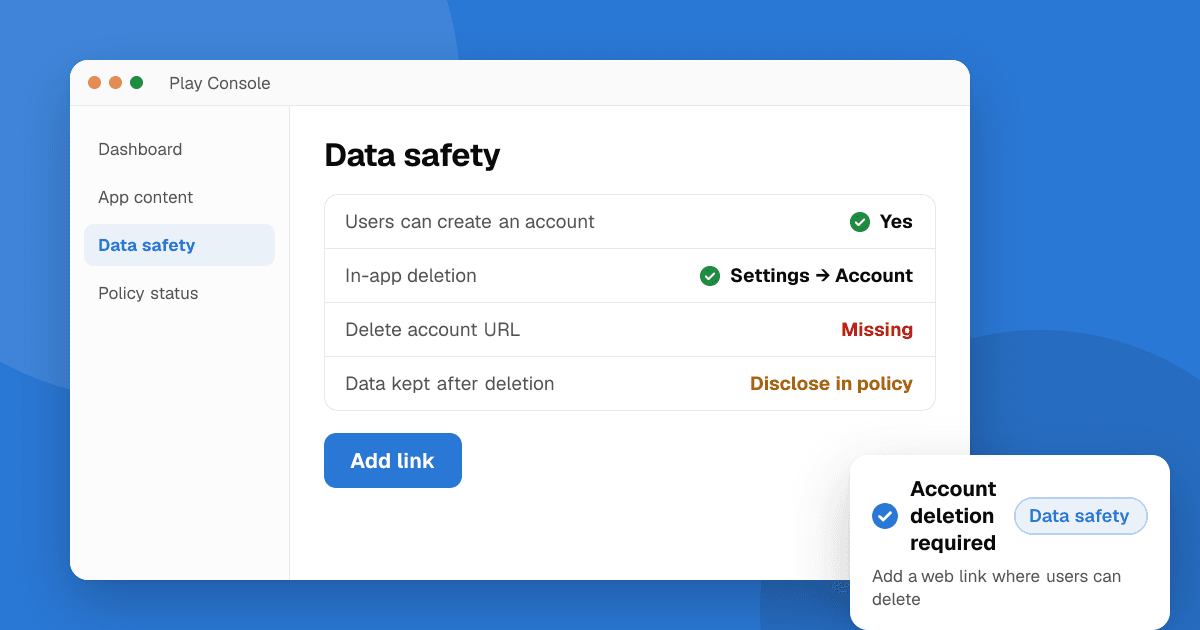
Short answer: if your app lets people create an account, Google Play's User Data policy says users must be able to request deletion of that account and its data in two places: inside the app and on a web page they can reach without the app. You put the web page's link in the Data safety form (Play Console → App content → Data safety), in the data deletion questions. Deleting the account must also delete the data tied to it; "freezing" or deactivating it doesn't count. If you keep some data for security, fraud prevention or legal reasons, say so, for example in your privacy policy.
This guide follows Google's account deletion help page and the User Data policy as of November 2026. It isn't legal advice: privacy laws in some countries add their own deletion rules.
What does the account deletion notice in Play Console mean?
Play Console asks every developer to answer a set of Data deletion questions in the Data safety form. If you say your app lets users create an account, it asks for a link where users can request that their account and its data be deleted. Developers often call this field the "Delete account URL". The exact labels in Play Console change from time to time, so we don't quote them word for word here; look for the account and data deletion part of the Data safety form.
The rule behind it is in the User Data policy. Google writes:
"If your app allows users to create an account from within your app, then it must also allow users to request for their account to be deleted. Users must have a readily discoverable option to initiate app account deletion from within your app and outside of your app (for example, by visiting your website). A link to this web resource must be entered in the designated URL form field within Play Console."
So the notice is asking for two things: a deletion option in the app, and a working web link in the form.
Does my app need account deletion?
Yes, if users can create an account for your app. Google's help page defines an app account as a user identity you provide so a person can sign in across apps or devices, usually with a username, email, password, phone code, single sign-on (such as "Sign in with Google") or similar.
Some cases that people ask about:
| Situation | Needs account deletion? |
|---|---|
| Sign-up with email and password in the app | Yes |
| Sign-in with Google or another provider that creates an account on your server | Yes |
| The app sends users to a website to create the account | Yes: Google counts this as account creation |
| Most features work without an account, but sign-up is offered | Yes |
| No accounts at all | No account deletion, but you still answer the data deletion questions |
| Accounts that are created and used fully offline | No: Google says these aren't app accounts |
| Permanently private apps and enterprise device management apps | Exempt |
Even if your app has no accounts, every developer must still answer the Data deletion questions in the Data safety form.
What must the in-app deletion option do?
Google asks for an option that is easy to find. Its example is the account settings screen or a similar section. A good setup looks like this:
- Settings → Account → Delete account (not buried in a help article).
- A short screen that says what will be deleted, what you keep and why, and how long it takes.
- A confirmation step, then the deletion itself, or a clearly sent request.
Google says a full deletion inside the app is the best experience, but you may also open your web deletion page from the app instead. Apps on non-mobile surfaces such as Android TV or Wear OS don't need an in-app option, but they still need the web page and the link in Play Console.
What must the delete account web page contain?
Google's help page lists what it checks. The page must:
- Work. It loads without errors.
- Name the app or developer exactly as it appears on your Google Play listing.
- Make the deletion request easy to find. The steps to request deletion should be the main thing on the page, not hidden at the bottom of a long policy.
- Let users request deletion without the app. Many people have already uninstalled it, so the page can't just say "open the app and go to Settings".
- Explain any extra steps, such as canceling a subscription first, and offer a support route for them.
You can accept requests in different ways: a button that starts deletion, a form, or a support email address. If you reuse your privacy policy page, the deletion section must stand out, for example with an anchor link straight to it (such as yoursite.com/privacy#delete-account).
A simple page that passes these checks:
- A heading such as "Delete your [App name] account".
- The developer name as shown on Google Play.
- The steps: "Send an email to support@yoursite.com from the address you signed up with, with the subject 'Delete my account'", or a form with an email field.
- What gets deleted, what you keep (and for how long), and how long the request takes.
- A note about subscriptions: deleting the account doesn't cancel a Google Play subscription, so tell users how to cancel it.
If you have no website, a small hosted page is enough. Our guide on building a landing page for your app covers free options.
What data has to be deleted?
When you delete an account at the user's request, you must also delete the user data linked to that account. Google says all data you declared as collected in your Data safety section is in scope. Examples it lists include personal details, payment information, contacts, location, photos and other sensitive data.
Three details matter:
- Deactivating is not deleting. The policy says temporary deactivation, disabling or "freezing" an account doesn't count.
- Service providers. If a provider processes the data for you (a backend, analytics or email tool), delete it from your servers and ask the provider to delete it too.
- Timing. Google asks you to tell users what to expect and finish requests "within a reasonably quick period of time". It doesn't set a number of days; local laws may.
Can I keep some data after deleting an account?
Yes, for legitimate reasons such as security, fraud prevention or regulatory compliance (for example, purchase records you must keep for tax). You must tell users clearly what you keep and why. Google gives your privacy policy as an example of where to say it. Our privacy policy guide shows how to write a short retention section, and the free privacy policy generator gives you a draft.
Can users delete data without deleting their account?
You can offer this, but it's optional. Google's help page says you have the chance to show users that you also delete other data, and your store listing can then point users to that option as well as to account deletion. Typical examples are clearing activity history, photos or messages while keeping the account. If you offer it, describe it on the same web page and add that link in the form when asked.
How do I fill in the data deletion questions in Play Console?
- Open your app in Play Console.
- Go to App content (under Monitor and improve → Policy and programs in the current menu) and open Data safety.
- Work through the form. In Data collection and security, answer whether you provide a way for users to request that their data is deleted.
- In the account deletion questions, say whether your app lets users create an account. If it does, paste your web deletion link.
- If you offer data deletion without account deletion, say so and add that link too.
- Check the Store listing preview, then Submit.
Your answers must match your app. If the Data safety form says users can't create an account but the app has a sign-up screen, expect a rejection.
What happens if I skip it or the link is wrong?
Google's help page says that if there are problems with your Data deletion answers, new app submissions and app updates are rejected in Play Console, and that non-compliant apps can face further enforcement, such as removal from Google Play. The original 2023 deadline and the extension to May 31, 2024 have both passed, so the requirement applies to every app now.
Common reasons the link gets flagged:
- The URL returns an error, redirects to a home page or needs a login.
- The page doesn't mention the app or developer name from the store listing.
- The page only says "delete your account in the app".
- The link points to a long privacy policy with no clear deletion section.
Fix the page, then submit the Data safety form again.
Next steps
Today: add Delete account to your app's account settings, publish a simple deletion page with your app's name on it, and paste the link into the Data safety form. Then check that your privacy policy mentions what you keep after deletion. If you're shipping an update anyway, check the target API level and the 16 KB page size requirement too, and make sure you've declared your trader status.
When your app is ready for more users, list your app on TrueLaunch for free and get honest feedback from other developers.
Related: what is Google Play Console and how to publish your first app on Google Play.
Frequently asked questions
Does every Google Play app need an account deletion link?
Only apps that let users create an account need the in-app deletion option and the web link. But every developer must answer the Data deletion questions in the Data safety form, even when the app has no accounts.
Is in-app account deletion enough without a web page?
No. Google asks for both. The web page is for people who have uninstalled the app or can't open it, so they must be able to request deletion there without going back to the app.
Where do I add the delete account URL in Play Console?
In the Data safety form, on the App content page. In the data deletion questions, say that your app lets users create an account and paste the link to your deletion page.
Can the delete account page just be a support email address?
Yes, a page that explains how to request deletion by email is allowed, as are a form or a deletion button. The page must load, name the app or developer as on Google Play, and make the deletion steps easy to find.
Does deactivating an account count as deleting it?
No. Google's User Data policy says temporary deactivation, disabling or freezing an account doesn't count. You must delete the account and its data, except data you keep for reasons like security, fraud prevention or legal compliance, which you must disclose.
What happens if my account deletion answers are wrong?
Google says new app submissions and updates are rejected when there are problems with the Data deletion answers, and non-compliant apps can face further enforcement, such as removal from Google Play.
