Google Play 16 KB page size requirement: check and fix your app before February 1, 2027
From February 1, 2027, Google Play blocks updates that don't support 16 KB memory pages. How to tell if your app is affected, how to fix it and how to test it.
· 4 min read
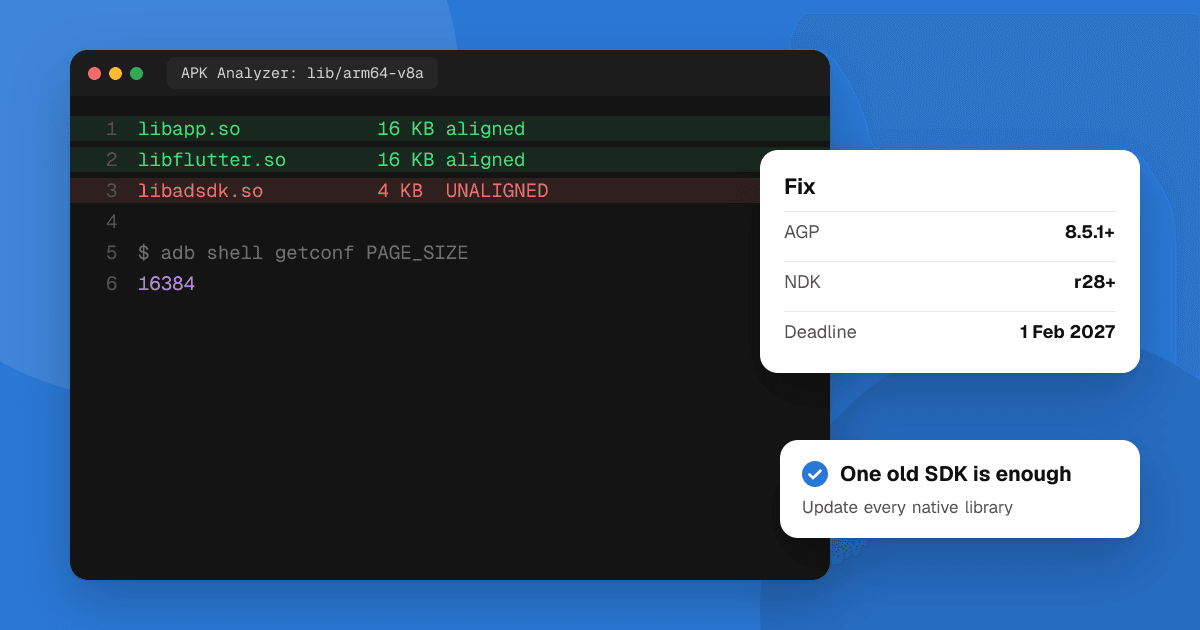
Short answer: every app on Google Play that targets Android 15 (API level 35) or higher must support 16 KB memory page sizes on 64-bit devices. From February 1, 2027, you can't release updates that don't. Apps written only in Kotlin or Java, with no native libraries, already comply. If your app or any SDK in it ships native .so libraries (common with game engines, Flutter, React Native, media, AR and many ad or analytics SDKs), rebuild with Android Gradle Plugin 8.5.1 or higher and NDK r28 or higher, update those SDKs, then test on a 16 KB emulator.
This guide follows Google's 16 KB page size guide as of November 2026. Play Console shows the deadline that applies to your app.
What is the 16 KB page size requirement?
Android has always used 4 KB memory pages. From Android 15, devices can use 16 KB pages, which Google says make apps launch faster under memory pressure and use less power. Native code built for 4 KB pages may not load or may crash on those devices, so Google Play requires native libraries to be 16 KB aligned.
Play Console shows a warning on affected apps: "Your app must support 16 KB memory page sizes". Earlier deadlines (November 2025, then extensions into 2026) have been replaced by the February 1, 2027 date for updates.
Is my app affected?
Your app uses native code, and may be affected, if any of these apply:
- You use C or C++ code through the Android NDK.
- An SDK or library you include ships native libraries.
- It's built with a game engine or an app builder that uses native libraries on the device.
To check for sure:
- In Android Studio, choose Build → Analyze APK and open your APK.
- Look in the
libfolder. Nolibfolder or no.sofiles means no native code: you're fine. - If there are
.sofiles, the Alignment column warns about any that aren't 16 KB aligned.
Android Studio's lint also flags unaligned native libraries in your project.
How do I fix it?
- Update the Android Gradle Plugin to 8.5.1 or higher. It packages uncompressed native libraries with 16 KB zip alignment.
- Build native code with NDK r28 or higher, which aligns to 16 KB by default. On NDK r27 or lower, add the linker flags
-Wl,-z,max-page-size=16384and-Wl,-z,common-page-size=16384. - Update every SDK with native code to a version its maker says supports 16 KB. This is where most apps get stuck: check each SDK's release notes.
- Remove code that assumes 4 KB pages, such as a hard-coded
PAGE_SIZEor4096. Usegetpagesize()orsysconf(_SC_PAGESIZE)instead. - Prebuilt libraries you compiled yourself need rebuilding with the same settings.
Google's tip: with AGP 8.5.1+, NDK r28+ and 16 KB-compatible dependencies, your app is compatible by default.
What about Unity, Unreal, Flutter and React Native?
- Unity and Unreal: follow the engine-specific steps Google links from its guide, and update to an engine version that builds 16 KB-aligned libraries.
- Flutter and React Native: update to a current framework version and Android toolchain, then update every plugin or native module that includes
.sofiles. One old plugin is enough to fail the check. - App builders: ask the builder whether its Android output supports 16 KB pages, and rebuild.
How do I test 16 KB support?
- In Android Studio's SDK Manager, download an Android 15 or higher 16 KB page size system image for the emulator, and create a virtual device with it.
- Check the device with
adb shell getconf PAGE_SIZE: it should print16384. - Verify your APK's alignment with
zipalign -c -P 16 -v 4 your-app.apk. - Test the app thoroughly, especially anything that uses native code.
Some Pixel phones (Pixel 8 and later) also have a Boot with 16KB page size developer option for on-device testing. For a wider device check, see how to test your app on many Android devices.
Checklist before February 1, 2027
- Run APK Analyzer on your latest release build.
- Update AGP, the NDK and every native SDK.
- Test on a 16 KB emulator and release the update through a testing track first.
- While you're updating, check you also meet the target API level requirement and finish the trader status declaration, which is due the same day.
Next steps
Check your app with APK Analyzer today: if there's no lib folder, you're done. If there is, plan the update now rather than in late January, when SDK makers will be busy. After you ship it, list your app on TrueLaunch to get testers and honest feedback on the new build.
Frequently asked questions
What is the deadline for the Google Play 16 KB page size requirement?
Starting February 1, 2027, Google Play won't let you release app updates that don't support 16 KB memory page sizes. It applies to apps targeting Android 15 (API level 35) or higher on 64-bit devices.
Does a Kotlin-only app need to do anything for 16 KB pages?
No. If your app and all its libraries and SDKs are written only in Kotlin or Java, it already supports 16 KB devices. Google still recommends a quick test on a 16 KB emulator.
How do I know if my app has native code?
Open your APK with Android Studio's APK Analyzer and look for a lib folder with .so files. If there are none, your app has no native code. If there are, the Alignment column flags any that aren't 16 KB aligned.
Which tools build 16 KB-aligned apps by default?
Android Gradle Plugin 8.5.1 or higher handles packaging, and NDK r28 or higher compiles native libraries 16 KB-aligned by default. Third-party SDKs with native code must also be on 16 KB-compatible versions.