Google Play photo and video permissions: fix READ_MEDIA_IMAGES with the photo picker
Play Console flagged READ_MEDIA_IMAGES or READ_MEDIA_VIDEO? Who may keep broad photo access, how to declare it, and how to switch to the photo picker instead.
· 9 मिनट में पढ़ें
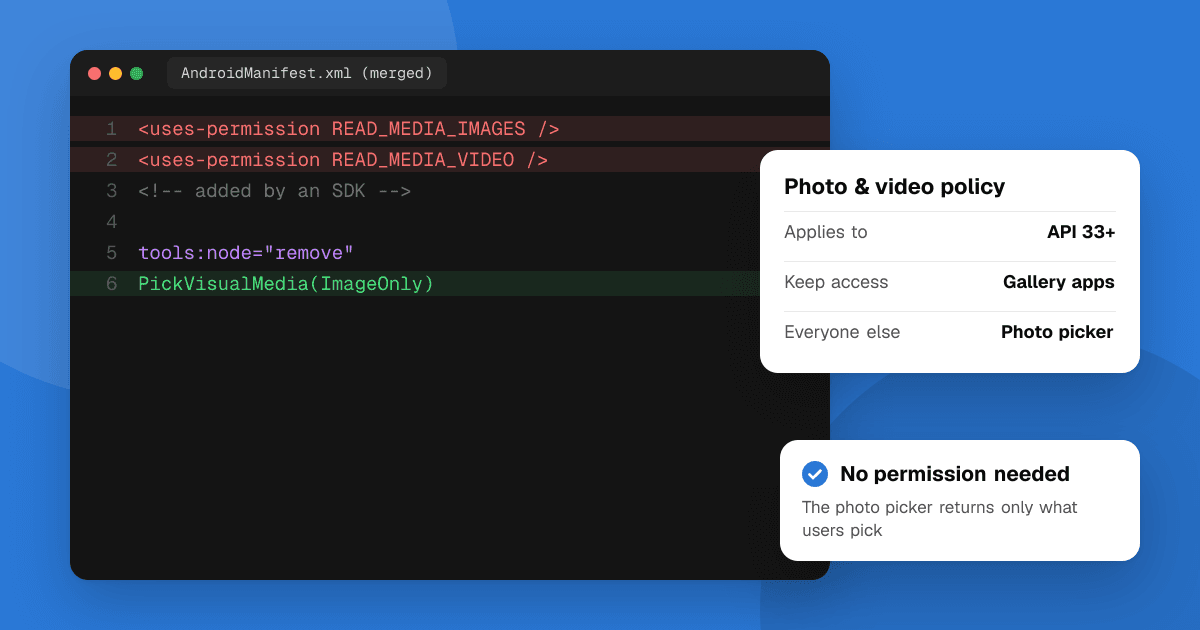
Short answer: if your app targets Android 13 (API level 33) or higher, Google Play only lets it keep the READ_MEDIA_IMAGES and READ_MEDIA_VIDEO permissions when broad access to the user's photos and videos is its core function, such as a gallery app, and you've had that use approved through a declaration in Play Console. Every other app, including ones that just let users pick a profile picture or attach an image, must remove both permissions and use a system picker such as the Android photo picker, which needs no permission at all. The final deadline, including for extensions, was May 28, 2025, so this now applies to every release you send. If you didn't add the permissions yourself, a library did: remove them in your manifest with tools:node="remove".
This guide follows Google's Photo and Video Permissions policy and its help page on restricted permissions as of November 2026.
What does the Photo and Video Permissions notice in Play Console mean?
Google sent this notice to every developer whose app requests the two permissions. Its reminder starts: "This reminder is for developers with apps that carry READ_MEDIA_IMAGES and READ_MEDIA_VIDEO permissions." It then gives three choices (Google's reminder):
- "Declare your app's need for broad access: If your app's core functionality requires broad access to photos and videos, you can submit a declaration for review in Play Console. We will evaluate your request to determine if your use case is approved."
- "Remove the READ_MEDIA_IMAGES and READ_MEDIA_VIDEO permissions from your app: If your app only needs occasional access to photos and videos, remove the READ_MEDIA_IMAGES and READ_MEDIA_VIDEO permissions from all version codes within the submission. This includes both production and testing tracks."
- Request an extension, which ran until May 28, 2025 and is now over.
The policy itself says: "Apps that target Android 13 or higher (API level 33+) may only request the READ_MEDIA_IMAGES and READ_MEDIA_VIDEO permissions if system pickers (like the Android Photo Picker) are not sufficient for your app to provide core functionality. Apps that still request the READ_MEDIA_IMAGES and READ_MEDIA_VIDEO permissions must submit a Play Console declaration to demonstrate access needs for Photos and why Android Photo Picker (or alternatives) would not suffice."
Which apps can keep READ_MEDIA_IMAGES and READ_MEDIA_VIDEO?
Google's help page answers this directly: "Apps whose core functionality revolves around broad access to Photos and Videos may use the permissions above." It gives these examples:
- Apps "whose core function includes managing and maintaining all of users' photos/videos (such as "gallery apps")".
- Apps "whose core function is not served by the Photo Picker's features - for example, where the picker is not technically sufficient."
Two things don't qualify on their own:
- A custom picker. "Apps that have custom pickers are not automatically qualified to use the permission - they must still submit a declaration in Play Console demonstrating why Android Photo Picker (or other alternatives) is not sufficient."
- Occasional use. Uploading an avatar, attaching a photo to a chat or post, scanning a receipt, choosing a wallpaper for a level in a game: these are one-time or infrequent picks, which is exactly what the picker is for.
| Your app | What to do |
|---|---|
| Gallery, photo manager, backup or cleaner for the whole library | Keep the permissions, submit the declaration |
| A feature the picker technically can't do (explain why) | Keep the permissions, submit the declaration |
| Profile photo, attachments, sharing, one-off edits | Remove the permissions, use the photo picker |
| Never touches photos (a library added the permission) | Remove the permissions |
| Private or enterprise device management app | Exempt from this requirement |
How do I switch to the Android photo picker?
The photo picker shows the user's photos and videos in a system screen and returns only the items they choose. Your app needs no storage permission for it. Google's photo picker guide recommends version 1.7.0 or higher of the androidx.activity library, which gives you two contracts: PickVisualMedia for one item and PickMultipleVisualMedia for several.
// Registers a photo picker; no READ_MEDIA_* permission needed.
val pickMedia = registerForActivityResult(PickVisualMedia()) { uri ->
    if (uri != null) {
        // Use the image or video the user chose
    }
}

// Images only; use ImageAndVideo or VideoOnly as needed.
pickMedia.launch(PickVisualMediaRequest(PickVisualMedia.ImageOnly))
Things worth knowing:
- Device support. The picker runs on Android 11 (API level 30) and higher with Google System Updates. Google Play services can install a backported version on Android 4.4 to 10 and on Android Go devices running 11 or 12. Where the picker isn't available at all, the library falls back to
ACTION_OPEN_DOCUMENT, still with no permission. - Longer access. Access to picked files lasts until the device restarts or your app stops. For long uploads in the background, call
takePersistableUriPermission()on the returned URI. - You don't have to use this picker. Google says: "You are not required to use the Android photo picker and can integrate other system pickers per your preference as needed."
Cross-platform frameworks have image picker plugins that call the system picker on Android. Update them to their current version and then check the final manifest, because older versions or extra features may still declare the broad permissions.
How do I remove READ_MEDIA_IMAGES if an SDK adds it?
This is the most common reason the warning won't go away. Your own manifest may be clean, but a library's manifest is merged into your app at build time.
- Find where it comes from. In Android Studio, open
AndroidManifest.xmland click the Merged Manifest tab at the bottom of the editor (Google's manifest merge guide). It shows each permission and which library added it. - Check the actual bundle you upload. With bundletool:
bundletool dump manifest --bundle=app-release.aab | grep READ_MEDIA. - Remove it with a merge rule in your app's main manifest. Google describes
tools:node="remove"as the way to drop an element "provided by a lower-priority manifest file that's out of your control (such as an imported library)".
<manifest xmlns:android="http://schemas.android.com/apk/res/android"
    xmlns:tools="http://schemas.android.com/tools">

    <!-- Drop broad media access that a library merges in -->
    <uses-permission android:name="android.permission.READ_MEDIA_IMAGES"
        tools:node="remove" />
    <uses-permission android:name="android.permission.READ_MEDIA_VIDEO"
        tools:node="remove" />
    <!-- Only used together with the two above; not needed with the picker -->
    <uses-permission android:name="android.permission.READ_MEDIA_VISUAL_USER_SELECTED"
        tools:node="remove" />

</manifest>
Where that manifest lives depends on your tools:
- Native Android, Flutter, React Native:
android/app/src/main/AndroidManifest.xml(orapp/src/main/in a native project). Remember to add thexmlns:toolsline. - Expo: list the permissions under
android.blockedPermissionsin your app config, then rebuild. - Unity: enable a custom main manifest in Player Settings, Publishing Settings, and add the lines there.
- No-code builders: ask the builder's support. Several platforms added these permissions automatically and had to ship a fix.
Then test every place your app lets users choose a photo. If a library really needed the permission for a feature you use, that feature will now fail, and it's a sign to swap that feature to the picker.
Why does the warning stay after I removed the permission?
Google says the permissions must be gone from "all version codes within the submission. This includes both production and testing tracks." A build still active on internal, closed or open testing with the old manifest keeps the issue open. Release the fixed build (with a higher version code) to every track that still serves an old one, or replace those releases, and then send the changes for review. If you use testing tracks, check each one.
How do I submit the photo and video permissions declaration?
Only do this if broad access really is your app's core function.
- Open the app in Play Console.
- Go to Monitor and improve → Policy and programs → App content.
- Open the photo and video permissions declaration and answer for each permission your app requests.
- Save, then send your release for review from Publishing overview.
What makes a declaration convincing:
- Name the core function in one sentence, the way your store listing does: "a gallery app that organizes and backs up the user's whole photo library."
- Say why the picker isn't enough, in technical terms: for example, the app must scan the whole library in the background, which a picker selection can't provide.
- Keep it consistent with your store listing, screenshots and Data safety form. A reviewer who sees a chat app claiming to be a gallery will reject it.
Google reviews the request: "We will evaluate your request to determine if your use case is approved." If your use is "users upload a photo", it won't be: use the picker.
What about partial access on Android 14 (READ_MEDIA_VISUAL_USER_SELECTED)?
From Android 14, users can give an app access to selected photos only (Google's partial access guide). Apps with their own gallery screen can handle this with the READ_MEDIA_VISUAL_USER_SELECTED permission. But that permission is requested together with READ_MEDIA_IMAGES or READ_MEDIA_VIDEO, so it doesn't get you around the policy: if your app declares the broad permissions, the Play rules above still apply. Google's own recommendation in that guide is the photo picker, "without having to request any storage permissions."
Apps that are approved for broad access still have to work for people who say no. Google's help page: "you must make a reasonable effort to accommodate users who do not grant broad access to media files on their device." Offer the picker as a fallback.
What happens if I ignore it?
Google's timeline says: "May 28, 2025: Full policy compliance is mandatory for all developers, including those who requested an extension. After this date, all apps are subject to removal from Google Play if not compliant." In practice, developers report that Play Console rejects new releases that still carry the permissions without an approved declaration, so you find out the next time you ship an update.
The same pattern now applies to other permissions. Google's policy preview lists a similar Contacts rule (use the Contact Picker) for apps targeting Android 17, and location has its own change: see the location permission policy for 2027 and the target API level requirement.
Next steps
- Search your merged manifest and your uploaded bundle for
READ_MEDIA_. - If photos aren't your app's core function, switch to the photo picker and remove the permissions with
tools:node="remove". - Release the fixed build to every track, production and testing.
- Only if you're a gallery-style app, submit the declaration in App content.
- Update your Data safety form if what you collect changed.
Once your update is live, list your app on TrueLaunch to get it in front of other developers and early users for honest feedback. For everything else Google announced recently, see the October 2026 policy update.
Frequently asked questions
Can my app keep READ_MEDIA_IMAGES just to let users upload a profile photo?
No. Uploading or attaching a photo is occasional use, which Google says should use a system picker such as the Android photo picker. Only apps whose core function is broad access to photos and videos, like gallery apps, can keep READ_MEDIA_IMAGES and READ_MEDIA_VIDEO after an approved Play Console declaration.
Does the Android photo picker need any permission?
No. The photo picker returns only the photos or videos the user chooses, without any storage permission. Use PickVisualMedia or PickMultipleVisualMedia from androidx.activity 1.7.0 or higher.
I never added READ_MEDIA_IMAGES. Why does Play Console say my app uses it?
A library or plugin added it through manifest merging. Check the Merged Manifest tab in Android Studio, then remove the permission in your app's manifest with tools:node="remove" and upload a new build.
Why does the warning remain after I uploaded a build without the permission?
Google requires the permissions to be removed from all version codes in the submission, including testing tracks. Release the fixed build to every track that still has an older build with the permissions, then send the changes for review.
Where is the photo and video permissions declaration in Play Console?
Open your app, go to Monitor and improve, Policy and programs, App content, and complete the photo and video permissions declaration. Google reviews it and decides whether your use case is approved.
What was the deadline for the Photo and Video Permissions policy?
Google set May 28, 2025 as the date full compliance became mandatory for all developers, including those who requested an extension. Apps that don't comply are subject to removal from Google Play.
